 TYPINGTESTEXAM.COM
Learn English QWERTY Typing
Read the original English QWERTY lesson objectives, conditions and drills. View the matching keyboard and start free practice after signing in with mistake review.
English QWERTY keyboard
Use the matching operating-system keyboard. Unicode input and composition are preserved.
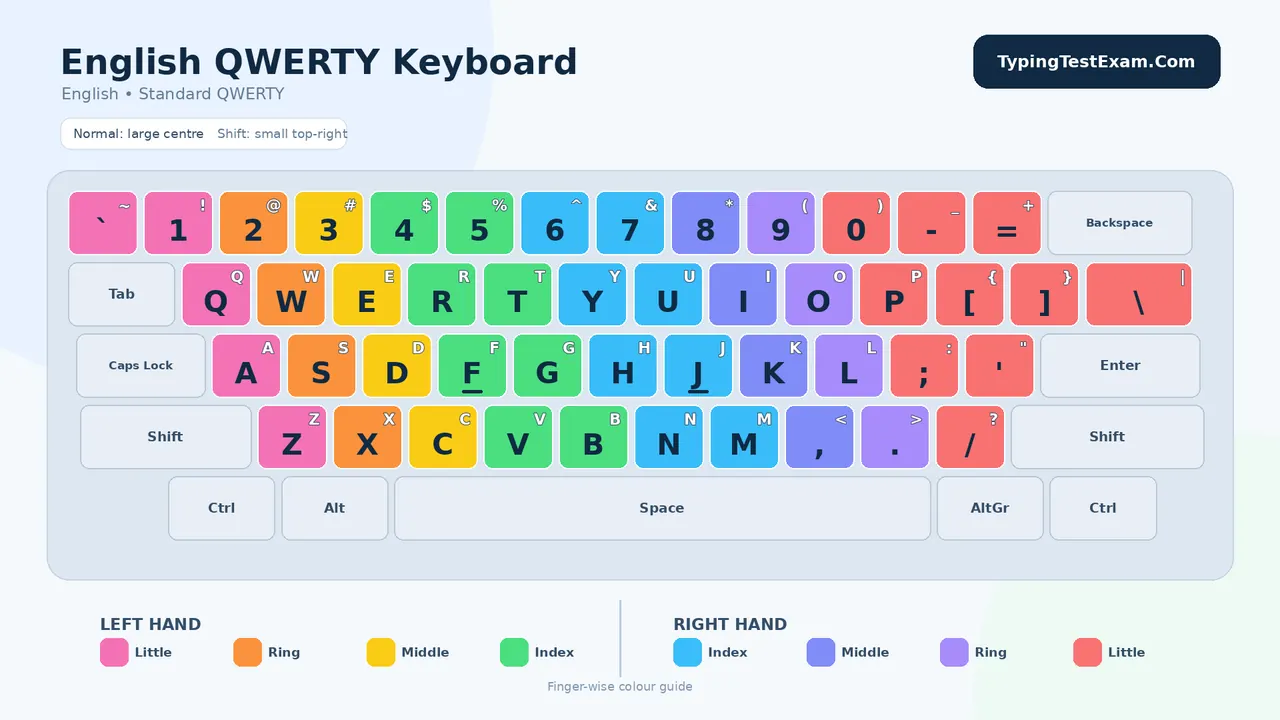
Open the full image to zoom. Physical-keyboard practice is recommended.
Lessons 1–14
Sign in to view saved practice history. Reading a lesson never marks it complete.
Lesson 1: Home Row Control · Beginner
Objective
Build correct finger placement and learn to return every finger to the home row without looking down.
Practice conditions
- Use only the home-row keys shown in this lesson.
- Type each pattern 5 times, then each word line 3 times.
- Use the space bar with either thumb; keep wrists relaxed.
- Stop and reset if your fingers leave their home positions.
Completion target: 98% accuracy; 8 clean lines
Pattern Drill
asdf jkl;   asdf jkl;   asdf jkl;
fdsa ;lkj   fdsa ;lkj   fdsa ;lkj
asdfgf ;lkjhj   asdfgf ;lkjhj
Word Drill
sad  lad  fall  hall  glad  flag  glass  salad
ask  dash  flask  flash  shall  slash  jag  hash
a lad asks; a lass falls; a glad lad shall laugh
Lesson 2: Upper Row Reach · Beginner
Objective
Reach upward from the home row while keeping unused fingers anchored lightly.
Practice conditions
- Return immediately to the home key after every upper-row stroke.
- Type the pattern drill 5 times and the word drill 3 times.
- Do not chase speed; aim for even rhythm.
- Correct only after completing the current word.
Completion target: 97% accuracy; correct reach
Pattern Drill
qwer uiop   qwer uiop   qwer uiop
awerqfa ;oiupj;   awerqfa ;oiupj;
qa ws ed rf   ju ki lo p;
Word Drill
quiet  equip  power  paper  prepare  require
writer  folder  liquid  praise  upper  people
a quiet writer prepared a proper reply for the office
Lesson 3: Forefinger Reach and Rhythm · Beginner
Objective
Strengthen the central columns controlled by the forefingers and maintain a regular typing rhythm.
Practice conditions
- Keep F and J as anchor keys; feel their guide marks.
- Type each pattern 5 times without pausing inside a group.
- Say each letter softly if it helps finger–key memory.
- Repeat the word line until no key is struck by the wrong finger.
Completion target: 97% accuracy; steady cadence
Pattern Drill
gftfrf hjyjuj   gftfrf hjyjuj
fr ft fg   ju jy jh   fr ft fg   ju jy jh
rtyu fghj   rtyu fghj   rtyu fghj
Word Drill
further  youth  theatre  gather  freight  truth
urgent  regular  future  figure  thorough  rhythm
the young writer gathered the urgent file for review
Lesson 4: Lower Row Control · Beginner
Objective
Reach downward from the home row and type lower-row letters and punctuation with correct fingers.
Practice conditions
- Move the finger, not the whole hand, toward the lower row.
- Type pattern lines 5 times and word lines 3 times.
- Use the right middle finger for comma and the right ring finger for full stop.
- Insert one space after a comma and two only when your test rule specifically requires it.
Completion target: 96% accuracy; no hand movement
Pattern Drill
zxcv bnm,.   zxcv bnm,.
azxcvf lkmnbj   azxcvf lkmnbj
za sx dc fv   jb kn lm ,.
Word Drill
civic  examine  number  volume  movement  minimum
zero  cabin  vacant  become  balance  maximum
a vacant cabin became a calm and convenient venue.
Lesson 5: Full Alphabet and Common Words · Beginner
Objective
Combine all letter rows, develop automatic key location, and practise common English words.
Practice conditions
- Type the alphabet forward and backward 5 times.
- Use sentence case exactly as printed.
- Complete three 2-minute attempts; record the best result.
- Do not proceed until the final attempt has fewer than 4 errors.
Completion target: 96% accuracy; 12 WPM
Alphabet Drill
abcdefghijklmnopqrstuvwxyz,.
.,zyxwvutsrqponmlkjihgfedcba
the five boxing wizards jump quickly.
Sentence Drill
Lost time is never regained.
A friend in need is a friend indeed.
Measure your words before they leave you.
Children learn quickly when practice is calm and regular.
Truth, patience, and discipline build dependable skill.
Lesson 6: Numbers and Number Groups · Beginner
Objective
Learn number-row reaches and type dates, amounts, percentages, codes, and grouped figures accurately.
Practice conditions
- Use the standard finger allocation for the number row; return to the home row after each digit.
- Type each number group 5 times.
- Preserve commas, decimal points, slashes, and leading zeroes.
- Accuracy in numbers is mandatory: one wrong digit makes the whole group incorrect.
Completion target: 95% accuracy; all figures exact
Number Drill
12345 67890   12345 67890   09876 54321
153  4,586  48,766  1,298  96,842
01/04/2026  29/08/2026  10:30  17:45
Rs. 1,250.50  18%  7.5%  2026-27  004581
Applied Line
Invoice 2087 dated 29/08/2026 totals Rs. 48,766.50.
Room 214 has 36 chairs, 18 tables, and 2 printers.
The target is 35 WPM with at least 95% accuracy.
Lesson 7: Shift Keys, Capitals and Symbols · Beginner
Objective
Use the opposite Shift key for capitals and type essential symbols without disturbing posture.
Practice conditions
- For a right-hand letter, hold the left Shift; for a left-hand letter, hold the right Shift.
- Release Shift immediately after the capital or symbol.
- Type each line 4 times.
- Preserve apostrophes, quotation marks, brackets, hyphens, ampersands, and question marks exactly.
Completion target: 95% accuracy; correct opposite Shift
Capital Drill
India  Monday  Quality  West Bengal  New Delhi
A S D F G   H J K L   Q W E R T   Y U I O P
Mr. Rao and Ms. Sen visited Office No. 12.
Symbol Drill
! @ # $ % ^ & * ( ) _ +
'Accuracy' (95%) + 'Speed' (35 WPM) = Success!
Can you type the file-name: Report_2026-27_Final.docx?
The manager said, "Please submit Form A-12 by 5:30 p.m."
Lesson 8: Sentence Practice · Intermediate
Objective
Practise complete sentences containing all rows, capitals, punctuation, numbers, and symbols.
Practice conditions
- Type each sentence 3 times, then type the complete set once without stopping.
- Leave one space after punctuation unless the source shows otherwise.
- Use Enter only at the end of each displayed sentence.
- Complete one 5-minute test and record all errors.
Completion target: 96% accuracy; 18 WPM
Sentence Set
Pack my box with five dozen bright yellow folders.
A quick typist checks every figure before sending the report.
On 2 January 2026, the office received 18 sealed applications.
Have you saved the file as 'Final_Copy_03' in the correct folder?
Messrs Verma & Co. supplied 24 chairs at Rs. 1,850 each.
Good posture reduces fatigue, improves control, and supports accuracy.
The notice stated: "Candidates must report by 8:30 a.m."
Practice for 20 minutes, rest for 5 minutes, and then review errors.
No shortcut can replace patient, focused, and regular practice.
Speed grows naturally when correct finger movement becomes automatic.
Lesson 9: Paragraph Practice · Intermediate
Objective
Move from isolated sentences to short paragraphs while preserving flow, punctuation, and paragraph breaks.
Practice conditions
- Set left and right margins evenly; use 1.5 line spacing if practising on paper.
- Type each paragraph twice: first untimed, then for 5 minutes.
- Do not press Enter at the end of a displayed line; allow automatic word wrapping.
- Press Enter only when the paragraph ends.
Completion target: 96% accuracy; 22 WPM
Paragraph 1
A national flag represents the unity, dignity, and shared hopes of a country. When citizens salute it, they remember the sacrifices made by earlier generations and renew their responsibility to protect peace, equality, and progress. Respect for a national symbol should be expressed through responsible conduct, honest work, and concern for other people.
Paragraph 2
Self-confidence develops through preparation rather than wishful thinking. A learner who practises a small skill every day begins to notice fewer mistakes, smoother movement, and better concentration. These improvements may appear slowly, but they become dependable when the learner measures progress honestly and corrects repeated errors.
Paragraph 3
An efficient office depends on accurate information. Names, dates, account numbers, addresses, and amounts must be entered exactly as supplied. A fast document containing incorrect details creates delay and confusion, whereas a carefully prepared document supports sound decisions and professional service.
Lesson 10: Script and Copy Transcription · Intermediate
Objective
Develop the ability to read a source, retain a short phrase, and reproduce it accurately without looking back after every character.
Practice conditions
- Read 3–5 words ahead, type the phrase, and return your eyes to the source.
- Preserve headings, paragraph breaks, abbreviations, capitalization, and punctuation.
- Mark unclear source text for review; do not invent missing information.
- Proofread once from the end toward the beginning to catch omissions and repeated words.
Completion target: 95% accuracy; faithful formatting
Source A — Office Note
OFFICE NOTE
Subject: Verification of training records for August 2026
All section heads are requested to verify attendance, test scores, and pending assignments by 3 September 2026. Any correction must be supported by the original register. The consolidated statement should be sent to the Training Coordinator before 4:00 p.m.
Source B — Handwritten-Style Draft (type as formal text)
dear sir,
please arrange 25 keyboard covers + 10 usb extension cables for lab 2. delivery needed before monday, 7 sept. kindly confirm price and warranty.
regards, office assistant
Required Output for Source B
Convert the draft into a properly capitalized business message without changing its facts. Use suitable punctuation and paragraph breaks.
Lesson 11: Accuracy Builder · Intermediate
Objective
Reduce substitutions, omissions, additions, transpositions, spacing errors, and punctuation errors.
Practice conditions
- Complete a 7-minute copy without using Backspace on Attempt 1.
- On Attempt 2, use Backspace only before leaving the current word.
- Circle or list every error category after each attempt.
- Repeat the passage until accuracy reaches 98% twice.
Completion target: 98% accuracy; 25 WPM
Accuracy Passage
The records section received 46 applications on Friday, but only 42 were complete. Two applicants had omitted their signatures, one had written an incorrect registration number, and another had attached an unreadable copy of the certificate. The assistant prepared a deficiency notice for each applicant and entered the dispatch details in Register No. 7. Before closing the file, the supervisor compared every name, date, and reference number with the original application. This careful review prevented four avoidable errors from entering the final list.
Error Review
Substitution
Omission
Addition
Transposition
Spacing
Punctuation
Lesson 12: Official and Business Paragraphs · Intermediate
Objective
Practise realistic office passages containing references, dates, amounts, lists, and formal sentence structure.
Practice conditions
- Type each passage in 10 minutes with normal paragraph spacing.
- Copy all reference numbers and financial figures exactly.
- Keep headings in capitals and body text in sentence case.
- Proofread figures separately after proofreading words.
Completion target: 97% accuracy; 28 WPM
Formal Passage 1
NOTICE: The Skill Assessment Test will be conducted in Computer Lab 3 on 14 September 2026 from 10:00 a.m. to 12:00 noon. Candidates must carry an identity card and report 30 minutes before the test. The qualifying standard is 35 net words per minute with 95% accuracy. Electronic notes, mobile phones, and personal storage devices are not permitted inside the laboratory.
Formal Passage 2
With reference to Purchase Order NEA/KT/2026/184 dated 18 August 2026, we confirm receipt of 12 keyboards, 12 optical mice, and 6 headsets. During inspection, Keyboard No. K-118 was found defective and Headset No. H-204 had a damaged cable. Kindly replace both items within seven working days without additional cost.
Formal Passage 3
The training centre collected Rs. 24,750 as course fees during the week ending 29 August 2026. After approved expenses of Rs. 8,425.50, the balance of Rs. 16,324.50 was deposited on 31 August 2026. Deposit Slip No. 004581 was attached to the cash record.
Lesson 13: Timed Speed Practice — 5 Minutes · Advanced
Objective
Build speed through continuous, controlled movement while maintaining examination-level accuracy.
Practice conditions
- Warm up for 3 minutes before each timed attempt.
- Set a timer for exactly 5 minutes and stop immediately when it rings.
- Do not restart after an error; continue calmly.
- Calculate Gross WPM, Accuracy, and Net WPM using the rules of your target examination.
Completion target: 30–35 Net WPM; ≥96% accuracy
Take no more than three timed attempts in one session.
5-Minute Passage 1
Technology has changed the way offices receive, organise, and share information. A document that once moved through several desks can now be reviewed by a team within minutes. However, faster communication also increases the need for careful checking. A wrong attachment, an incomplete address, or a misplaced decimal can spread quickly and create serious difficulty. For this reason, an efficient keyboard operator must combine speed with judgment. Before sending a document, the operator should confirm the recipient, subject, file name, date, and attachment. Sensitive information must be handled according to office rules, and working copies should be stored in clearly named folders. Regular backups protect valuable records when equipment fails. Good digital habits are therefore not separate from typing skill; they are part of professional accuracy. The best operators maintain an even rhythm, read ahead, and notice unusual names or figures before typing them. They also pause briefly between long tasks so that fatigue does not reduce concentration. With disciplined practice, these habits become automatic and allow a person to complete more work without lowering quality.
5-Minute Passage 2
Public service depends on timely action and reliable records. Every application received by an office passes through a sequence of checking, registration, movement, decision, and communication. If one stage is delayed or recorded incorrectly, the applicant may have to make repeated visits. A well-trained assistant helps prevent this problem by entering details promptly and attaching the correct reference to each communication. Clear language is equally important. An official letter should explain what has been decided, what action is required, which documents are needed, and the date by which a reply should be sent. Long expressions that hide the main point should be avoided. When a request cannot be accepted, the reason should be stated respectfully and, where possible, the next available remedy should be mentioned. Accurate typing makes these communications easier to read and strengthens public confidence. It also supports supervisors by ensuring that summaries and reports are based on dependable information. Thus, keyboard skill is not merely a mechanical ability; it contributes directly to efficient and responsible administration.
Lesson 14: Final Exam Simulation — 10 Minutes · Advanced
Objective
Complete a realistic 10-minute test under fixed conditions and demonstrate stable speed, accuracy, and concentration.
Practice conditions
- Use the same font, screen zoom, keyboard layout, Backspace rule, and error rule as your target examination.
- Do not practise the final passage immediately before the test.
- Begin only when the timer starts; stop exactly at 10 minutes.
- Save or submit according to the chosen test rule.
Completion target: Target test standard achieved 3 times
Pass the lesson after meeting your target in three tests held on different days.
10-Minute Final Passage
A training programme becomes effective when every stage has a clear purpose. At the beginning, learners should understand the correct posture, finger position, and method of striking each key. These basic habits may seem slow, but they protect accuracy when speed increases. The next stage should combine letters into familiar words and short sentences. Regular repetition helps the fingers remember common movements without conscious effort. Once the learner can type complete sentences comfortably, practice should shift toward paragraphs containing capitals, punctuation, numbers, and formal expressions.
Timed work must be introduced gradually. A short test of two or five minutes develops rhythm, while a longer test measures concentration and endurance. The learner should record gross speed, errors, accuracy, and net speed after every test. Improvement is easier to understand when these results are compared over several days instead of judging one unusually good or bad attempt. Repeated errors also provide useful information. If the same pair of letters is often reversed, a focused drill can correct the movement. If numbers create difficulty, separate number-row practice should be added before the next timed passage.
Professional typing requires more than fast fingers. The operator must read carefully, preserve the meaning of the source, and notice details that may require verification. Names, dates, addresses, amounts, reference numbers, and instructions deserve special attention because a small error can affect an entire record. The operator should also follow the document format requested by the organisation. Headings, margins, paragraph breaks, line spacing, and file names are part of the work and should not be treated as decoration.
During an examination, calmness is valuable. A candidate who becomes anxious after one mistake may lose more time than the mistake itself required. It is better to continue with an even rhythm and apply the permitted correction rule without panic. The final minute should be used according to the examination instructions: some tests allow review, while others submit automatically. Familiarity with the interface and rules prevents surprises.
Consistent practice creates confidence. Twenty focused minutes each day can be more useful than an irregular session lasting several hours. The learner should warm up, complete one main exercise, review errors, and finish with a short accurate copy. Rest is also important because tired hands and eyes reduce control. Over time, correct movements become natural, speed rises, and difficult passages feel manageable. The goal is not simply to press more keys in less time. The real goal is to produce dependable text that can be used immediately, without costly correction or confusion.
Final Test Record
Test
Date
Characters
Gross WPM
Errors
Accuracy
Net WPM / Result
1
Completion Checklist
☐  I use the correct finger for every letter, number, and common symbol.
☐  I keep my eyes on the source or screen instead of the keyboard.
☐  I preserve capitalization, punctuation, spacing, numbers, and paragraph breaks.
☐  I can type continuously for 10 minutes without losing posture or rhythm.
☐  I understand the Backspace and error rules of my target examination.
☐  I have achieved my required net speed and accuracy on three different days.
Trainer’s Certification
Record
Learner Name: __________________________________________
Required Standard: __________ Net WPM at __________% Accuracy
Best Result: ________________   Date: ___________________
Trainer’s Signature: _____________________________________
Course Design Note
This 14-lesson series follows the supplied textbook’s progression from fingering exercises (Lessons I–VII) to sentences (VIII), paragraphs (IX), script transcription (X), and speed practice. Additional accuracy, official-text, timed-speed, and exam-simulation lessons extend that sequence for modern computer-based typing tests.